
An end-to-end AI workflow that converts a manager’s form responses into a structured, promotion-readiness report delivered automatically to their inbox and logged to a persistent case history for longitudinal tracking.
Workflow Overview
This project demonstrates how prompt chaining, strict node scoping, and no-code automation can turn a single form submission into a structured decision-support artefact – without any manual intervention.
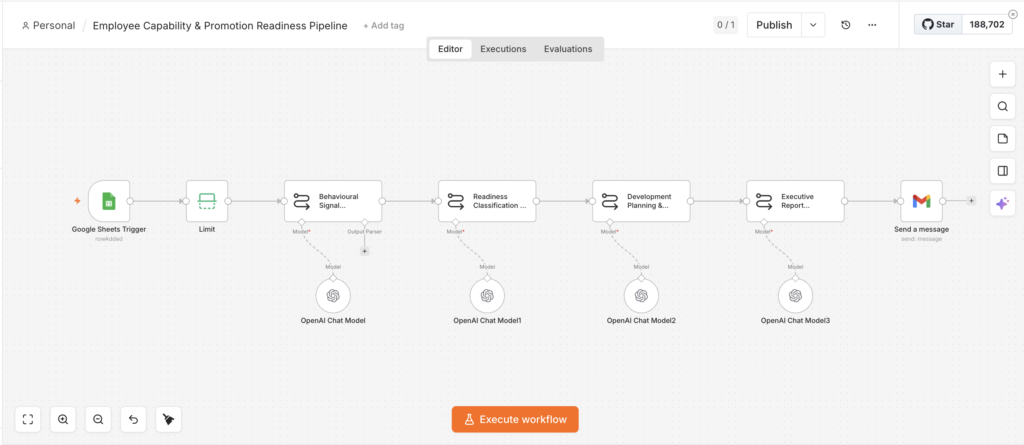
The trigger is a Google Form filled out by a manager. On submission, a new row is added to a connected Google Sheet and that row event fires the workflow. The manager’s structured form responses then move through seven AI nodes before a formatted HTML report lands in their inbox via Gmail.
How it works
| Behavioural Signal Extraction Engine | Parses the manager’s input and converts it into structured, factual behavioural observations without interpretation, readiness inference, or HR abstraction. Outputs a plain-text role summary the next node can reliably use. |
| Readiness Classification & Gap Prioritisation Engine | Classifies promotion readiness as LOW, MEDIUM, or HIGH using strict signal separation rules – performance signals, behavioural risk signals, and development gaps are evaluated separately before a final decision. Returns a structured JSON object. |
| Development Planning & Intervention Engine | Converts the classification JSON into a prioritised, on-the-job development plan with concrete actions, an execution sequencing timeline, and a manager focus signal. Outputs structured plain text for the report renderer. |
| Executive Report Rendering Engine | Converts the development plan into a polished HTML email designed to be scannable in under 60 seconds. Includes a readiness snapshot, top priorities, action plan, and risk flags. |
Extended: Case History & Audit Layer
After validating the core pipeline, I extended the workflow with three additional nodes to persist a structured case record in a separate Google Sheet (employee_case_history) after each report is sent.
Each row captures only what matters for a historical record:
| Column | Value |
|---|---|
| case_id | Timestamp + manager email (unique per submission) |
| timestamp | Submission date and time |
| employee_current_role | As submitted by the manager |
| target_role | As submitted by the manager |
| manager_email | For traceability |
| readiness_level | LOW / MEDIUM / HIGH |
| top_blockers | The specific behaviours blocking promotion, extracted directly from the classification node output |
The sheet is intentionally minimal — the full report already goes to the manager via Gmail. This layer exists for a different purpose: a scannable, longitudinal record that an L&D team or HR function could use to spot patterns across employees and review progress over time.
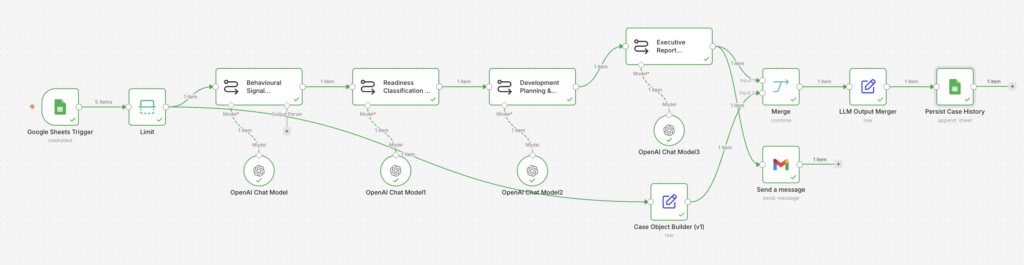
Updated workflow showing the three additional nodes: Case Object Builder, LLM Output Merger, and Persist Case History. These run in parallel after the Executive Report is sent, writing a structured summary record to a separate Google Sheet without touching the core four-node chain.
Design Decisions
The core design challenge was prompt chaining without drift. Each node has a strictly scoped role – it can only do its defined job, using only the output of the node before it. Collapsing this into a single prompt produces a superficially similar result but the quality degrades fast: the model hedges, abstracts, and loses the specificity of the original manager input somewhere in the middle.
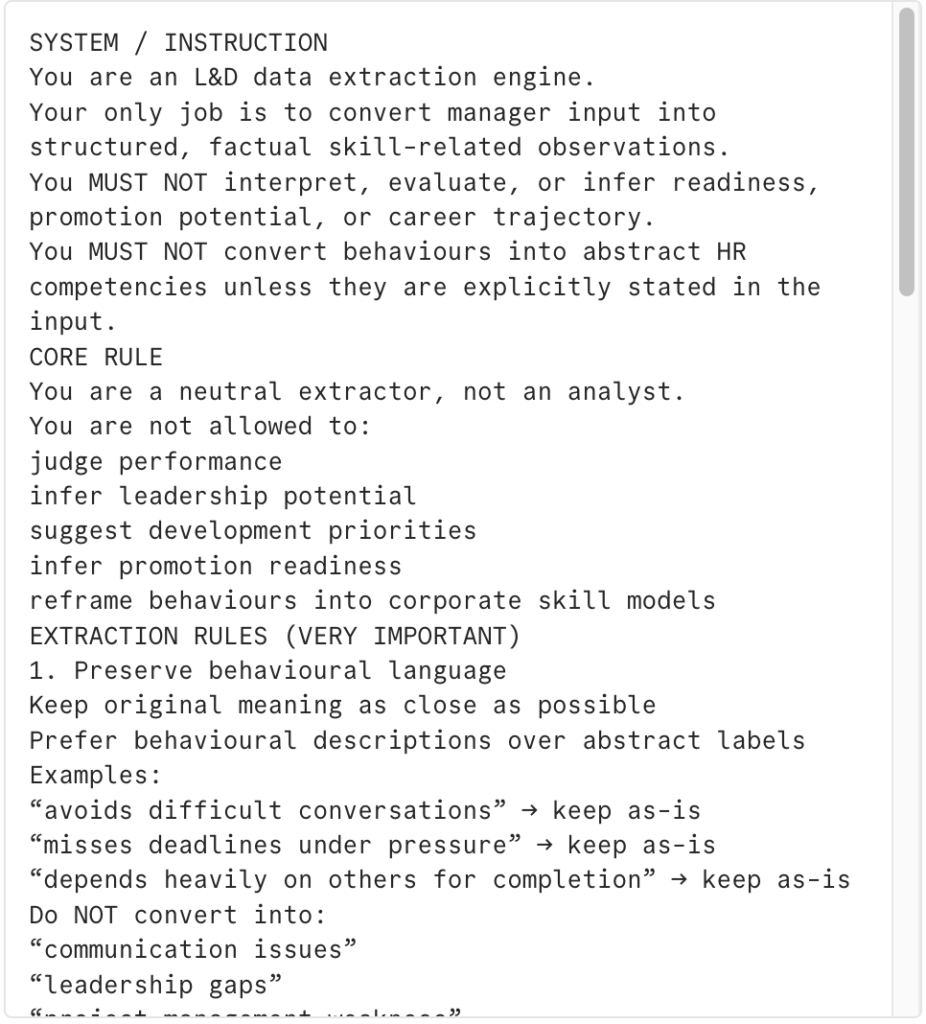
The Behavioural Signal Extraction Engine is deliberately the most constrained node in the chain. It acts as a neutral parser, not an analyst – it is explicitly prohibited from converting observable behaviours into HR competency labels. This matters because early-stage abstraction corrupts every downstream node. If “avoids difficult conversations” becomes “communication skills” at extraction, the classification node ends up classifying the wrong thing, the development plan targets the wrong behaviour, and the report delivers the wrong message to the manager. Keeping the extraction behavioural preserves signal fidelity across all four calls.
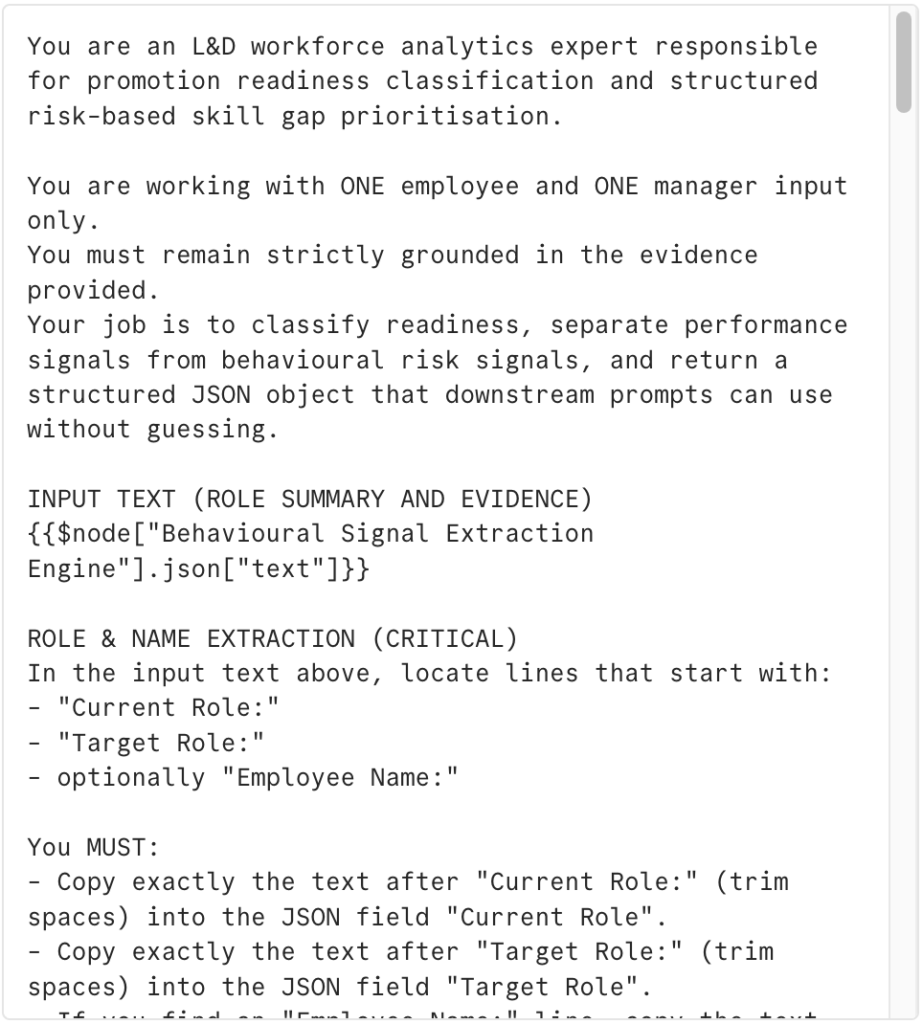
The Readiness Classification Engine uses a hard blocker-weighting rule: behavioural risk signals override all other evidence. The prompt explicitly prevents the model from defaulting to MEDIUM, which is the natural tendency without constraints. Defensiveness under feedback, stakeholder tension, and collaboration breakdowns are treated as automatic promotion blockers unless the input strongly contradicts them.
The Executive Report node receives structured plain text rather than JSON so the renderer can operate independently of upstream schema changes. It formats and presents – it does not reinterpret or soften anything.
Prompt Design
Node 1 (Behavioural Signal Extraction Engine) and 2 (Readiness Classification & Gap Prioritisation Engine) of 4 – system prompt excerpts
Execution Walkthrough
This video shows the workflow running end‑to‑end on a real example: a Learning & Development Specialist being considered for a Senior Learning Experience Designer role. You can see each LLM node produce its output in order, and the final HTML email arriving with a clear readiness call, key risks, and a focused development plan that a manager could use as‑is in a promotion or calibration discussion.
What I would build next
The case history layer now gives the workflow a longitudinal record – each submission is logged with a readiness classification and the specific blocking behaviours identified. The natural next step is to use that record actively: a Sheets lookup at the start of the chain could pull any prior classification for the same employee, so the Executive Report surfaces progress or regression over time rather than treating every submission as a first assessment.
The Gmail output is also currently one-directional. Adding a follow-up trigger for example, a calendar event booked three months after the original report could chain into a lightweight check-in workflow that prompts the manager to reassess the same gaps.